

Tag Archives: cable

Easier Maintenance, Easier Troubleshooting with Phoenix Contact

From |

If you were to connect one or more wires, you may simply think of connecting them from one point to another. Well, you can do that technically. However, things could get messier than expected.
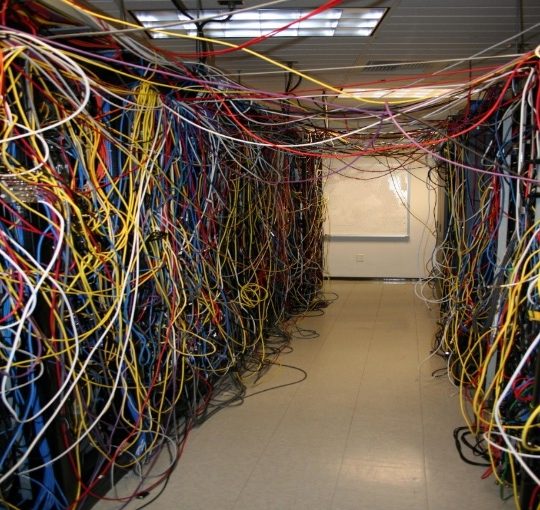
Image from: https://www.flickr.com/photos/belleville/59234524/in/photostream/

YES, without any prior planning on how wires are to be connected and a proper design of control cabinet layout, you may face the cable jungle, just like what you see in the photo. If you have to perform maintenance or troubleshooting on the control cabinets, this will possibly be one of your worst nightmares! It’s not only about complexity of your job but also your safety.

Not to worry, we are here to help!

Firstly, terminal blocks could be positioned in your control cabinet layout design. Terminal blocks, as a central termination point between the field wiring, provide you an easy and convenient method to group and/or distribute the wirings. This means terminal blocks could provide you with a neater control cabinet with cables.
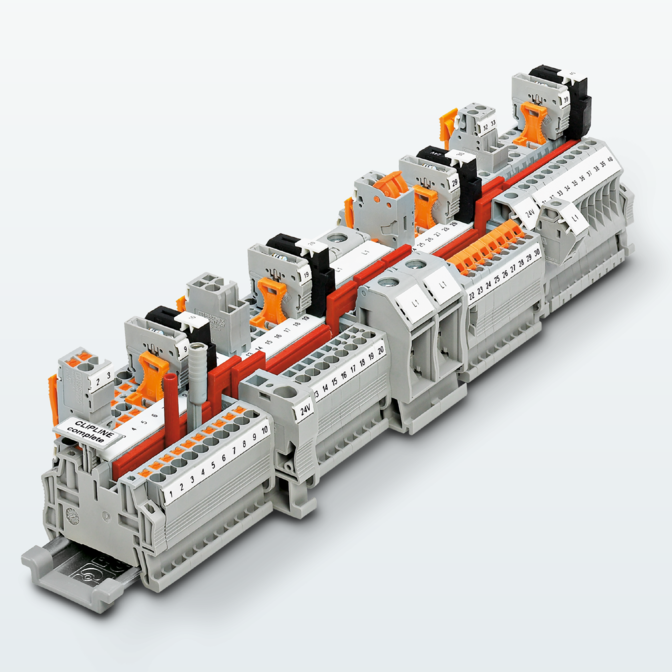
The wide product range of terminal blocks can be found in Phoenix Contact and you can choose based on your requirements and standards.

Once terminal blocks are in your control cabinets, you can finally escape from the cable jungle. Troubleshooting should be much easier for you to manage now than ever before.
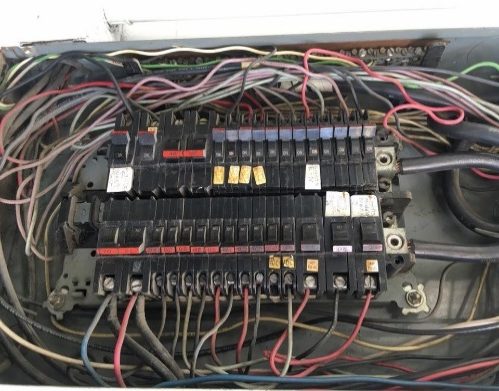
Image from: https://smartcsm.com/25-of-the-worst-electrical-panels-weve-ever-seen

Do you still think that your control cabinet is messy?

You may see the disorganised cables running around the area unmanaged. It might even look dangerous.

If this is what you see, it’s time to use cable ducts.

Even for cable ducts, Phoenix Contact provides many different types according to different situations and environments. The wide range of cable ducts enable flexible and optimum use of available space in your control cabinets.

Your working space will be significantly less cluttered with the use of terminal blocks and cable ducts now. All you need to do for maintenance and troubleshooting will then be straightforward and trouble-free.

Wait! Don’t bounce off yet! We have one more suggestion for easier maintenance, easier troubleshooting with Phoenix Contact. Let’s do a ‘Spot the Difference’ exercise! Can you find the difference between the two photos below?
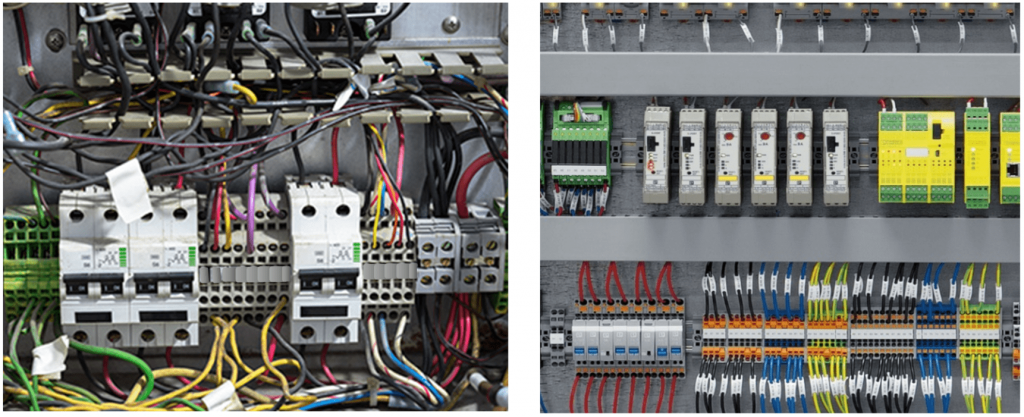
Apart from messier layouts, the main difference is missing labels. Did you manage to spot those? During testing and troubleshooting, you may realise that you can’t differentiate the cables, especially when they are routed from same location. The labels will be able to help you figure out where each cable is from just by looking at the control cabinet; you won’t have to manually route back where the cable is from. Labelling not only for the wires but for the terminal blocks and other components will benefit you for your routine maintenance and repairs. Easy identification of all the components will reduce your time and effort on handling the control cabinets.
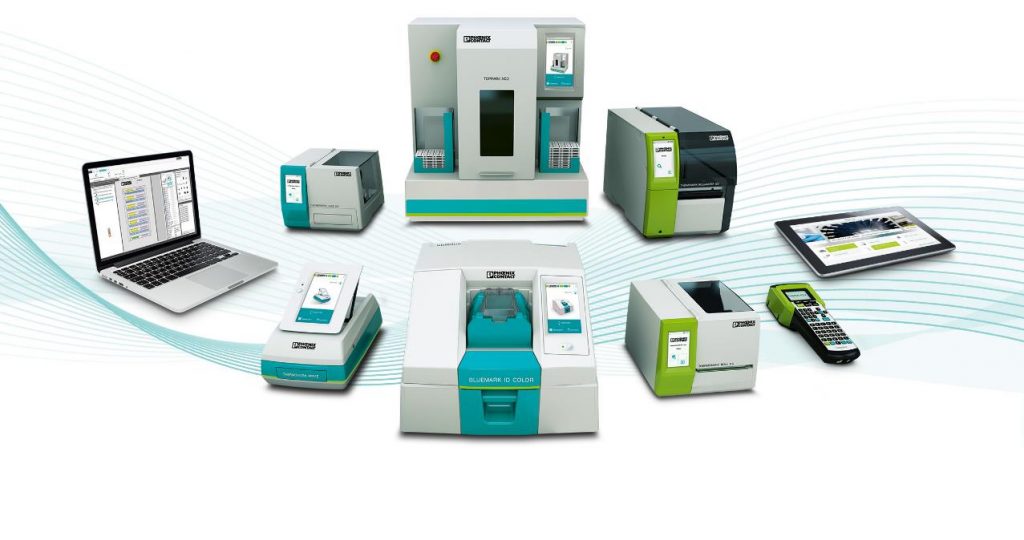
Phoenix contact has launched a series of marking materials and printers. Our printers are made user friendly with ‘simply easy’ motto. Our marking materials are developed with printing services that are widely available for:

  • Terminal blocks (not limited to Phoenix contact terminal blocks)
  • Wires (self-adhesive, clip type & with binder type)
  • Equipment (control panels, equipment tag, temp resist/proof labels, etc.)
  • Plant markings (warning labels)

Your worries and challenges for maintenance and troubleshooting of your control cabinets can now be tackled with ease.

Stripping Wires Fast and Easy

From |

Stripping cables is one of the processes in wire harnessing, besides cutting and crimping processes.

There are many ways to strip a cable, from using the conventional cutter to using the manual/automatic wire stripping.

There are some basic points we need to know in doing the stripping process.

  1. Cable size
  2. Stripping length

Choosing the correct tool and setting the correct stripping length will produce the perfect stripping result for crimping process.

Manual Stripping Tool

With manual stripping tool, there are some concerns such as fatigue, consistency of stripping length and time.

Automatic Stripping Tool

All the concerns with manual stripping tool can be solved with the Automatic Stripping Tool.

Phoenix Contact knows this and has developed automatic Stripping Tool called WF 1000.

With this automatic device, we can strip cables without any fatigue, get the precise length and it takes only 0.3s per process.

This machine will boost your productivity with high quality output.

Features:

  1. This compact stripping machine automatically insulates conductors with a cross section of 0.08 to 6 mm2.
  2. Multi-strand cables with a diameter of up to 6 mm are also stripped.
  3. Partial stripping is supported.
  4. Special insulations such as PTFE and silicone can be stripped, in addition to standard insulations
  5. The clamping force automatically adjusts itself to the required extraction force. This reduces/prevents pressure points on sensitive insulation.
  6. The stripping dimensions are set individually via rotary buttons. They are shown on the clear display.

You can check out the video of the WF 1000 below!

https://www.youtube.com/watch?v=ULYuzC7lrAk

For any demo request or enquiry, feel free to contact us at marketing@phoenixcontact.com.sg and we will be in touch!

Cable Entry System – CES

From |

Have you ever left your earphones in your pocket and when you wanted to use them again, they emerge as a tangled ball of mess? Annoying, isn’t it?

Well, the wiring of current and conventional electrical panels brings about a similar problem. The above picture shows its set up and at a glance, three words pop up in my mind: Complex; Costly; Time-consuming.

So why is this so?

Firstly, in the current system, multiple holes of different sizes need to be drilled in accordance with the cable sizes. Imagine the hassle having to drill ten holes of different diameter just to see messy wires intertwined together.

Next, a common occurrence to such wiring systems is the need to add additional cables. If you are lucky, there will be enough space on the flange plate to drill the extra holes. However, if the space is insufficient, or if you need larger holes for new cables, you would most likely have to replace the entire electrical panel and redo the entire wiring system from scratch. Not only does this add on to the hassle, it also adds on to labour and cost.

Lastly, conventional wiring systems require more time to rectify problems in communication. This is due to the difficulty in identifying specific cables especially when they are bundled together. The troubleshooting process thus leads to longer downtime which means financial losses for the company.

The Solution

Phoenix Contact has thus come up with a solution to eliminate this problem. Our Cable Entry System (CES) comes with specific features to tackle the hassle of the conventional system.

Firstly, only one or two holes would have to be cut to enable installation of up to ten cables in the system, greatly reducing the set up time. Furthermore, the CES can cater to different cable diameters ranging from 2mm-24mm. All these can be easily installed by mounting the sleeves of varying sizes on to the robust metal reinforced frame.

Next, additional cables can be installed by removing the blind sleeves from the extra cable holes provided by the CES. In the event that the existing cable configuration has to be amended, the CES allows for easy reassembly just by replacing the sleeves with those of different cable diameters. This eliminates the trouble of cutting out new holes on the flange plate.

Lastly, the CES allows cables to be easily identified as the rectangular frame organizes the sleeves holding the cables in an orderly manner that is easy on the eyes.

Besides tackling the inconveniences of the conventional electrical panel wiring, the CES offers protection class of IP54, making it suitable for harsh environment conditions.

If your current electrical wiring system reminds you of your ball of tangled earphones, it‘s about time you switch to Phoenix Contact’s Cable Entry System. Our CES will be the solution to increasing your productivity and cost saving to your electrical panels wiring.

Interested to find out more? Contact us at marketing@phoenixcontact.com.sg!

Home Fix-it: Cable Extension with Phoenix Contact QUICKON Connectors

From |

Good day!

Have you been faced with a situation in which you needed to extend your cable length without having to replace your existing one? This situation is quite common especially for customers in the machine building and material handling industry.

Taking into consideration that industrial standards require joints to be water- and dust-proof, the very thought of replacing a short cable and re-laying it with a longer cable can seem daunting. Not only is it a waste of material , it is also a waste of time which equates to significant cost over time.

I would like to share my personal hands-on experience with you. Two years ago, after moving into my new apartment, I was faced with a need to extend the wire for my fan as the wire given by the manufacturer was too short . At the same time I needed it to be water-proof, as I wanted to ensure that water did not seep into the joint when the floor was being mopped.

Quickon cable connectors , 1642153
As I had a couple of samples on my hand and I decided to use a Phoenix Contact QUICKON cable connector.

With the clearly written instructions from the manual that came with the standard package, I managed to join the two cables in less than five minutes. Sharing similar concerns as any of our customers would have, more skeptical of my own technical skills than of the insulation displacement technology, I turned on the fan and voila. The power flowed flawlessly and I was enjoying the breeze from the fan, bringing a smile to my face.

httpv://www.youtube.com/watch?v=M3YudXpogZ0

Till date I am still enjoying the cool breeze from my fan, powered by Phoenix Contact. Maybe it is about time to do another home project, how about a smart home system with the touch panel and controllers?