

DaUM Service as a block of a security strategy
In today’s fast-paced industrial environment, smooth and efficient production is vital—yet PLC backup and restore procedures, a critical component, are often overlooked.
PLC backup-and-restore procedures are vital for maintaining manufacturing system integrity. In addition, they ensure that the latest software is used, and preventing costly downtime. With cybersecurity in mind, asset management forms a key foundation, while device and update management—enhanced by backup and restore capabilities—is essential to a proactive, consistent security strategy.
Resetting an automation device due to a cyberattack
To ensure top cybersecurity and reliable system performance, it’s essential to standardize, automate, and securely install software and security updates. The OPC UA-based Device and Update Management Service offers a manufacturer-independent solution to manage this process.
Creating backups is always a smart move—not just for automation devices, but also in everyday life. We back up personal files like photos to avoid data loss, and similarly, industrial systems require backups in case a device fails or needs to be reset after a cyberattack.
The following discussion examines the second scenario, which is especially relevant to certifying the PLCnext Control product family, in the context of automation devices.
Free app for generating a backup of a PLCnext Control
PLC backups are essential to prevent loss of program and configuration data during hardware or power failures. Without a backup, restoring from scratch can cause extended downtime, productivity loss, and high costs. The Device and Update Management S
ervice enables fast system recovery by restoring the previous state. In security emergencies, it allows quick data reloading to a new or repaired controller, minimizing disruption.
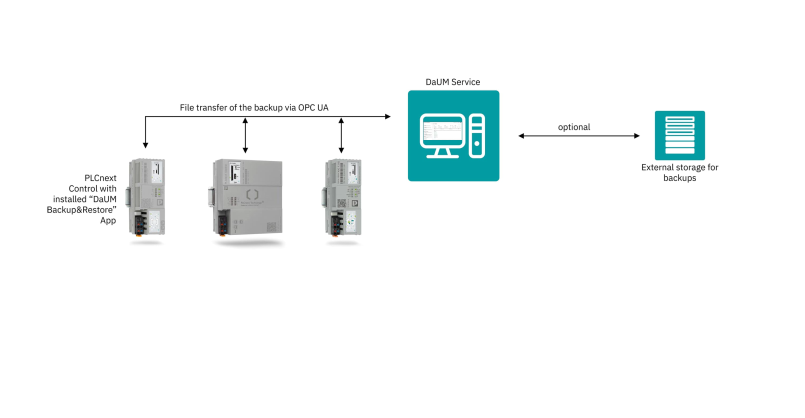
Backup-and-restore mechanisms enable quick system recovery after failures or resets by restoring previously saved data to the same PLCnext Control device. In the current version of Device and Update Management, the “DaUM Backup and Restore” app handles backup creation and restoration. It’s available for free download from the PLCnext Store.
To back up a PLCnext Control, the user sets up and authenticates the OPC UA connection. Once the system detects the “DaUM Backup and Restore” app and confirms the file transfer settings, the user can start a manual or scheduled backup. Backups run during live production without disrupting PLC operations, with data sent directly to the management service.
Protecting the integrity and confidentiality of every backup
The Device and Update Management Service with the “DaUM Backup and Restore” app creates backups for restoring to the same asset, including hardware-specific data not transferable to other devices. Each backup lists key files such as the PLC project, network and user settings, logfiles, and installed apps.

In line with IEC 62443, backups are treated as “information at rest” and are encrypted, signed, and embedded with integrity data to detect tampering or corruption—preventing restoration of compromised files. The service also logs the creation time, contents, and device identity.
On the “Backups” page, users can view archived backups per asset, listed in protocol files. Clicking “Restore” verifies the signature and restores the device to its previous state.
Updating software with OPC UA
Phoenix Contact’s OPC UA-based Device and Update Management Service enables vendor-independent updates of automation devices using the OPC UA 10000-100 standard. It now supports a broad range of components—from controllers to power supplies. Security is enforced system-wide, with all actions authenticated and authorized per IEC 62443. The service is also flexible, running on an edge PC, central server, or automation device based on system size and needs.
Read more about PLCnext technology, and DaUM.
